Part5 - ecovacs: Vacuum cleaner commands
Deebot in Home Assistant.
Ecovacs Deebot X5 pro doesn't start cleaning when you give the command to clean via home assistant.
How to create a script or action to clean specific room ECOVACS Deebot X5 Pro?
Ecovacs Deebot X5 pro start/stop/pause doesn't work ?
Table of Contents

https://blog.matterxiaomi.com/Posts/files/How-it-work-2_639072750757203567.jpg
Quick start
Set Cleaning Mode -> Set the work mode to "vacuum and mop"
Set vacuum fan level ->
Set water flow rate ->
Start Cleaning ->Send cleaning command to vacuum
when the cleaning is done and status changed to "returning', trigger "vacuum dockerd".
Step by step
room number
The room number in the attributes section which can be found in your device under the controls section
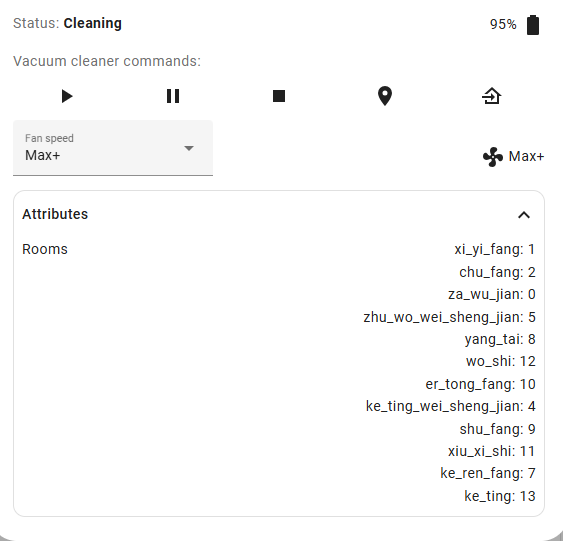
Use 'clean_V2' command for Deebot X5 series
Structure : The CleanV2 Command (Newer Models)
Newer models (like the X1 or T20 series) use the CleanV2 format which allows for specific "tasks":
{
  "header": { ... },
  "body": {
    "data": {
      "act": "start",
      "task": {
        "type": "customArea",
        "points": "-100,500,200,-300"
      }
    }
  }
}
Within the developer tools I can get the command to run via call service:
step 1.set work mode
Set the mode to "vacuum and mop"
step 2. Set Water Level
step 3. set fan speed
step 4.set room numer
step 5.send command
Deebot starts cleaning
Here is a script for a room clean.
Clean only certain rooms
single room vacuum only:
service: vacuum.send_command
target:
  entity_id: vacuum.matterxiaomi_deebot
data:
  command: clean_V2
  params:
    act: start
    content:
      type: freeClean
      value: 1,6
Note
type
freeClean:Whole house or room list
value: 1,6:area,comma-separated list of numbers starting by 0 (e.g. 1,3) for areas to be cleaned.
you just need to match the room number.
room 7 and 4
service: vacuum.send_command
target:
  entity_id: vacuum.matterxiaomi_deebot
data:
  command: clean_V2
  params:
    act: start
    content:
      type: freeClean
      value: "1,7;1,4"
Clean all
scenario clean -Clean custom area - Customize Clean
Quick Clean
service: vacuum.send_command
target:
  entity_id: vacuum.matterxiaomi_deebot
data:
  command: clean_V2
  params:
    act: start
    content:
      type: qcClean
      value: "5776"
Set virtual Wall
Developer tools - ecovacs.raw_get_positions
action: ecovacs.raw_get_positions
data: {}
target:
  entity_id: vacuum.deebotx5pro
Click "Perform Action"
output
vacuum.deebotx5pro:
  ret: ok
  resp:
    body:
      code: 0
      data:
        chargePos:
          - a: -90
            invalid: 0
            t: 3
            x: 6175
            "y": -8009
        deebotPos:
          a: -90
          invalid: 0
          x: 6175
          "y": -8010
        mid: "52243489"
      msg: ok
    header:
      fwVer: 1.74.0
      hwVer: 0.1.1
      pri: 1
      ts: "1771887027385"
      tzm: 480
      ver: 0.0.1
      wkVer: 0.1.54
  id: Pejq
  payloadType: j
getCleanInfo_V2
{"cleanState":{"category":0,"cid":"122","content":{"subContent":{"subContent":null,"type":"freeClean","value":"1,3;1,4;1,6;1,7"},"type":"freeClean","value":"1,3;1,4;1,6;1,7"},"motionState":"working","router":"plan"},"state":"clean","trigger":"none"}
Debug log
If you add the below to mqtt_client.py under line 248, then when you make a request from your app. you can see the value for each room or scenario:
cd /usr/local/lib/python3.13/site-packages/deebot_client
If you add the below to mqtt_client.py under line 248, then when you make a request from your app. you can see the value for each room or scenario:
        _LOGGER.info("FULL MQTT MESSAGE:\nTopic: %s\nPayload:\n%s", message.topic, message.payload.decode("utf-8", errors="replace"))
        self._last_message_received_at = datetime.now()
json
json_v2
xml
Start
https://api-ngiot.dc-cn.cn.ecouser.net/api/iot/endpoint/control?si=<redacted>&apn=clean_V2&fmt=j
{"body":{"data":{"act":"start","content":{"type":"auto"}}},"header":{"channel":"iOS","reqid":"RIzVHS","ts":"1741248430546","ver":"0.0.50","m":"request","pri":1,"tzm":480,"tzc":"Asia\/Shanghai"}}

Pause
https://api-ngiot.dc-cn.cn.ecouser.net/api/iot/endpoint/control?si=<redacted>&apn=clean_V2&fmt=j
{"body":{"data":{"act":"pause"}},"header":{"channel":"iOS","reqid":"yepkRW","ts":"1741248436662","ver":"0.0.50","m":"request","pri":1,"tzm":480,"tzc":"Asia\/Shanghai"}}

Resume
https://api-ngiot.dc-cn.cn.ecouser.net/api/iot/endpoint/control?si=<redacted>&apn=clean_V2&fmt=j
{"body":{"data":{"act":"resume"}},"header":{"channel":"iOS","reqid":"nYtIgx","ts":"1741248438194","ver":"0.0.50","m":"request","pri":1,"tzm":480,"tzc":"Asia\/Shanghai"}}

Stop
https://api-ngiot.dc-cn.cn.ecouser.net/api/iot/endpoint/control?si=<redacted>&apn=clean_V2&fmt=j
{"body":{"data":{"act":"stop"}},"header":{"channel":"iOS","reqid":"EiLUjr","ts":"1741248516782","ver":"0.0.50","m":"request","pri":1,"tzm":480,"tzc":"Asia\/Shanghai"}}

AI Clean Start
https://api-ngiot.dc-cn.cn.ecouser.net/api/iot/endpoint/control?si=<redacted>&apn=clean_V2&fmt=j
{"body":{"data":{"act":"start","content":{"type":"entrust"}}},"header":{"channel":"iOS","reqid":"pSKuSb","ts":"1741249424264","ver":"0.0.50","m":"request","pri":1,"tzm":480,"tzc":"Asia\/Shanghai"}}

Charge
https://api-ngiot.dc-cn.cn.ecouser.net/api/iot/endpoint/control?si=<redacted>&apn=clean_V2&fmt=j
{"body":{"data":{"act":"go"}},"header":{"channel":"iOS","reqid":"GDJHxj","ts":"1741249495751","ver":"0.0.50","m":"request","pri":1,"tzm":480,"tzc":"Asia\/Shanghai"}}

This is a single room vacuum only:
https://api-ngiot.dc-cn.cn.ecouser.net/api/iot/endpoint/control?si=<redacted>&apn=clean_V2&fmt=j
{"body":{"data":{"act":"start","content":{"type":"freeClean","value":"1,0"}}},"header":{"channel":"iOS","reqid":"MMTIad","ts":"1741249568936","ver":"0.0.50","m":"request","pri":1,"tzm":480,"tzc":"Asia\/Shanghai"}}
see:https://github.com/DeebotUniverse/client.py/issues/845#issue-2899767299
https://github.com/DeebotUniverse/client.py/issues/832#issuecomment-2810411425
Comments
Comments are closed