How to Install nextcloud on raspberry pi(Without Domain)
How to Install nextcloud on raspberry pi.
Normal Docker Works Without Domain.Local processing.
Table of Contents
Quick Start
Raspberry Pi OS Lite (Debian 12 bookworm) Setup
Install Type:docker Nextcloud
Nextcloud + Docker + RPi + Windows SMB, SQLite.
Access Nextcloud via http://{raspberry-pi-ip}:8120
I installed NextCloud Docker Image/Container on my Raspberry. Everything works fine.
Part 1.Installing Nextcloud on a Raspberry Pi with docker
step 1.Run Nextcloud (SQLite, NO DB container,Works via IP)
Note
Uses SQLite by default( No MariaDB / PostgreSQL)
Works via IP(No domain / HTTPS required)
Viewing the Nextcloud configuration (config.php)
# Inside container
docker exec -it nextcloud bash

# Check config:
grep dbtype config/config.php
output
'dbtype' => 'sqlite3',
step 2.First-Time Setup (Web UI)
http://<RPI-IP>:8280
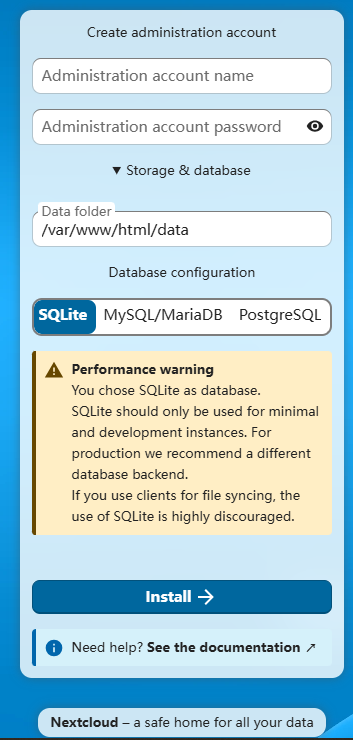
Note
Database:SQLite is selected
part 2.Use Windows folder share as external storage in Nextcloud
Mount shared folder on Windows10 into a folder in your nextcloud drive and use it as data storage.
Docker NextCloud connection via SMB to Windows 10
Create a shared folder on Windows10
Auto-Mount at Boot on rpi5
Mount Windows shared folder into Nextcloud
Backups
Files are located in the NextCloud folder, the data subfolder.
For example, the admin user, is probably in /var/www/html/nextcloud/data/admin/files/
make a backup of /var/www/html/nextcloud/data .
useful links
https://github.com/nextcloud/docker
http://localhost:4999/boards/topic/48316/nextcloud/page/3#82156
Comments
Comments are closed